


KeYmaera FAQ
KeYmaera is a verification tool for hybrid systems and built as a hybrid theorem prover for hybrid systems. Here we collect answers to frequently asked questions.
General Questions about KeYmaera
Where can I read about the KeYmaera approach
- Problem:
- I am looking for a reference on KeYmaera and want to understand how KeYmaera works.
- Solution:
- The most comprehensive description of the KeYmaera approach can be found in the book about the KeYmaera approach. Other canonical references on the KeYmaera approach are an article in J. Autom. Reas. and J. Log. Comput. A good survey can be found in an invited tutorial in LICS 2012. Together, these references give a good overview of how KeYmaera works. There are also some documentation and tutorials on KeYmaera. Also see logics of hybrid systems and the publication reading guide for more recommended readings on other parts of KeYmaera. The lecture notes for the course Foundations of Cyber-Physical Systems at Carnegie Mellon University can be helpful as well.
Is there a usage guide or tutorial for how to use KeYmaera's user interface?
- Problem:
- Where can I find out more about how to use and interact with KeYmaera productively?
- Solution:
-
General advice on how to use KeYmaera is available on the KeYmaera help pages.
KeYmaera Documentation
Specific advice and demonstrations of the KeYmaera User Interface Usage can be found in the
KeYmaera YouTube Channel
Installing and Launching KeYmaera
The KeYmaera Launcher installed KeYmaera but how do I start KeYmaera now?
- Problem:
- The KeYmaera Launcher successfully installed KeYmaera on my system. But how do I start KeYmaera next time I want to use it?
- Solution:
-
Just run the KeYmaera Launcher again, which will start KeYmaera.
If you want to, the KeYmaera Launcher will also check if updates are available for KeYmaera.
To run the KeYmaera Launcher, simply click on the file
keymaera-install.jar
or point your terminal into the directory where the file keymaera-installer.jar is located and type the following into your terminal:java -jar keymaera-installer.jar
- Also See:
-
- Tutorial: Install KeYmaera
- Tutorial: Open KeYmaera Using Java Web Start
The KeYmaera Launcher does not download KeYmaera or my company firewall interferes
- Problem:
- The KeYmaera Launcher starts, but it refuses to download and install KeYmaera on my system. Maybe my company firewall interferes?
- Solution:
-
If your computer is behind a restrictive company firewall that limits access to the web, the KeYmaera Launcher will not be able to connect to the web to download and install KeYmaera for you until you configure its proxy settings.
The easiest way to allow access through your company firewall is by adjusting and enabling the
Proxy Settingsin the KeYmaera Installer. Alternatively, you can to start the KeYmaera Launcher with the right information about your network from the command line. Run the KeYmaera Launcher again from the directory where the file keymaera-installer.jar is located and type the following into your terminal (all in one line):java -Dhttp.proxyHost=webcache.example.com -Dhttp.proxyPort=8080 -jar keymaera-installer.jarwhere you replacewebcache.example.comand8080with the information about the proxy required to connect to your network.
The KeYmaera Launcher complains about the Java Virtual Machine version. What now?
- Problem:
- When the KeYmaera Launcher starts, it says to
"Your Java Version is too Old". What do I do? - Solution:
-
You are running the KeYmaera Launcher in an old Java Virtual Machine (JVM 1.6 or earlier). You need to install a more recent version of Java, such as 1.7 or later. If you have installed a more recent Java Runtime or a corresponding Java Development Kit, then you may still have to make sure that your operating system uses that version of Java.
How to switch to another Java Virtual Machine version depends on your operating system. On the command line run, for example:
- Mac OS X
-
export JAVA_HOME=$(/usr/libexec/java_home -v 1.7)
- Windows
-
setx JAVA_HOME "C:\Program Files\Java\jdk1.7.0_72"
- Linux Ubuntu
-
sudo update-java-alternatives -s jdk-7-oracle-x64
java -jar keymaera-installer.jar
I told the KeYmaera Launcher to not bother me. How do I get it back to change its settings?
- Problem:
- I told the KeYmaera Launcher to Autostart KeYmaera so that it does not bother me when starting KeYmaera unless an update is available. Now I decide that I want to change some settings in the KeYmaera Launcher. How do I get the KeYmaera Launcher to show up again?
- Solution:
-
Start the KeYmaera Launcher with the
-vieweroption from the command line:java -jar keymaera-installer.jar -viewer
You can also change some of the settings directly in KeYmaera from the menu Options->Tool Paths
Installing and Configuring KeYmaera
KeYmaera or KeYmaera Webstart do not work but do not tell me why
- Problem:
- The installed KeYmaera or the KeYmaera Webstart do not work or they act strangely, but I cannot find any errors or exceptions.
- Solution:
-
If KeYmaera started successfully, but then acts strangely, take a look at the KeYmaera menu View->System Output.. to inspect if error messages or exceptions have appeared that hint at the problem.
If KeYmaera did not even start successfully, try both the KeYmaera Launcher and KeYmaera Webstart to see if either of those work better. If that did not improve the situation, then the you will first have to find the error output of your operating system.
Make sure that you have enabled the Java Console to see error outputs produced by KeYmaera / KeYmaera Webstart, that may otherwise go unnoticed. These exceptions can be helpful in finding out what went wrong. Depending on the operating system and browser, the Java Console can be enabled in the Java Plug-in or Java System Preferences or in the browser preferences. Unfortunately, how you do that depends on your operating system.
On Mac OS X, start the application /Applications/Utilities/Java Preferences and look at the tab Advanced. Then enable the options Java Console->Show console and Debugging->Enable logging. When restarting KeYmaera, carefully read the console output and the logg files in
~/Library/Caches/Java/log/.Besides, we encourage you to read through all questions and solutions in this FAQ to see if your issue happens to have been described and solved in more detail in another question.
KeYmaera could not load JLink native library
- Problem:
- KeYmaera complains that it cannot find a native library JLinkNativeLibrary required for interfacing with Mathematica. It outputs an exception like
Fatal error: cannot find the required native library named
JLinkNativeLibrary.
java.lang.UnsatisfiedLinkError:
  com.wolfram.jlink.NativeLink.MLOpenString
      (Ljava/lang/String;[Ljava/lang/String;)J
  at com.wolfram.jlink.NativeLink.MLOpenString(Native Method)
  at com.wolfram.jlink.NativeLink.<init>
  at com.wolfram.jlink.MathLinkFactory.createMathLink0
  at com.wolfram.jlink.MathLinkFactory.createMathLink
  at com.wolfram.jlink.MathLinkFactory.createKernelLink0
  at com.wolfram.jlink.MathLinkFactory.createKernelLink
  at de.uka.ilkd.key.dl.arithmetics.impl.mathematica.
      KernelLinkWrapper.createLink (KernelLinkWrapper.java:256)
- Solution:
-
The path to the JLink native library is wrong or the native library does not match match the computer CPU (Intel, PowerPC, ...) and architecture (x86-32bit or x86-64bit, ...). To change the jlink native library path use Options->Tool Paths menu. In the dialog that opens, look at the tab Mathematica Properties and make sure that the paths are entirely correct. Click apply and double check the MathKernel path and J/Link native directories. Also make sure that the J/Link path matches your 32bit or 64bit system architecture. Restart KeYmaera after changing this option.
The J/Link native library path depends on your operating system and Mathematica version. For Mac OS with recent Mathematica:
/Applications/Mathematica.app/Contents/SystemFiles/Links/JLink/SystemFiles/Libraries/MacOSX-x86-64For Mac OS with older Mathematica:
/Applications/Mathematica.app/SystemFiles/Links/JLink/SystemFiles/Libraries/MacOSX-x86-64For Linux:
/usr/local/Wolfram/Mathematica/SystemFiles/Links/JLink/SystemFiles/Libraries/Linux-x86-64For Windows:
C:\Wolfram\Mathematica\SystemFiles\Link\JLink\SystemFiles\Libraries\Windows-x86-64
Note that some systems will give you a hard time if you are using a space character or other special characters in any of the folder names. We recommend not to install Mathematica into directories like
C:\Program Files\Wolfram Research\Mathematica\9.0Instead install it into a folder without spaces like
C:\Wolfram\Mathematica\9.0
KeYmaera could not find MathLink executable
- Problem:
- KeYmaera throws an exception saying that it could not find MathLink executable like the following
java.rmi.RemoteException: Could not initialise math link;
  nested exception is:
  MathLinkException: 1004: Could not find MathLink executable.
  at de.uka.ilkd.key.dl.arithmetics.impl.mathematica.
      KernelLinkWrapper.createLink (KernelLinkWrapper.java:308)
- Solution:
-
Please check the path set to the file MathKernel. To change this path, use Options->Tool Paths menu. In the dialog that opens, look at the tab Mathematica Properties and make sure that the paths are entirely correct. Click apply and double check the MathKernel path and J/Link native directories. Make sure you can execute that file to call the kernel of Mathematica. Check if the MathKernel can compute expressions like
3+4.5successfully.
The J/Link native library path depends on your operating system and Mathematica version. For Mac OS
/Applications/Mathematica.app/Contents/MacOS/MathKernelFor Linux:
/usr/local/Wolfram/Mathematica/Executables/MathKernelFor Windows:
C:\Wolfram\Mathematica\MathKernel.exe
KeYmaera seems to have issues with Mathematica arithmetic
- Problem:
- KeYmaera starts but it does not do any nontrivial arithmetic. Maybe Mathematica does not work?
- Solution:
- Please check the path set to the file MathKernel.
To change this path, use Options->Tool Paths menu. In the dialog that opens, look at the tab Mathematica Properties and make sure that the paths are entirely correct. Click apply and double check the MathKernel path and J/Link native directories.
Make sure you can execute that file to call the kernel of Mathematica. Check if the MathKernel can compute expressions like
3+4.5successfully. For example type the following into Mathematica3+4.5+Sin[0.5]/3
and click Evaluation->Evaluate Cells in Mathematica. Make sure you get an answer similar to7.65981. If this works, try KeYmaera again. If the problem persists, then start the MathKernel from your command line and type3+4.5+Sin[0.5]/3
Make sure you get an output likeOut[1]= 7.65981
Check that you have configured KeYmaera options appropriately. If it still does not work, check for the issues and solutions mentioned on Mathematica J/Link. - Also see:
- KeYmaera could not load JLink native library
KeYmaera starts but when I prove anything it just hangs or performs strangely
- Problem:
- KeYmaera starts and I can click on prove. But when I do, it either hangs at a low percentage (5% for instance) or performs very strangely.
- Solution:
-
Make sure that your Mathematica can run successfully. Make sure you can execute that file to call the kernel of Mathematica. Check if Mathematica and the MathKernel can compute expressions like
3+4.5successfully see KeYmaera seems to have issues with Mathematica arithmetic). Also double check that you have selected the right paths in Options->Tool Paths menu. In the dialog that opens, look at the tab Mathematica Properties and make sure that the paths are entirely correct. Click apply and double check the MathKernel path and J/Link native directories. If you get the paths wrong, KeYmaera only works partially or may not work at all. Check for the issues and solutions mentioned on Mathematica J/Link. Check that you have configured KeYmaera options appropriately. If you use a slow arithmetic procedure or bad settings, do not be surprised if your proof takes a very long time. Please check KeYmaera's console output for warnings and errors.When in doubt, you may want to click Reset to Default in the Hybrid Strategy tab and retry. You may also want to remove all settings by removing all files in ~/.keymaera and start over with the whole configuration of KeYmaera.
- Also see:
-
KeYmaera seems to have issues with Mathematica arithmetic
KeYmaera could not load JLink native library
Segmentation fault or Java Virtual Machine panic
- Problem:
- KeYmaera crashes with a segmentation fault or the Java Virtual Machine panics.
- Solution:
-
Most likely, the J/Link native library path that you specified in the KeYmaera settings is incompatible with the Java Virtual Machine and platform that you are using. Make sure you indicate a path to the J/Link native library that actually matches the computer CPU (Intel, PowerPC, ...) and code (x86-32bit or x86-64bit, ...). To change this path see Options->Tool Paths menu, then in the tab Mathematica Properties make sure the paths are okay. Click apply and double check the MathKernel path and J/Link native directories. Restart KeYmaera after changing these options.
Also inspect KeYmaera's console output for warnings and errors. After a segmentation fault, KeYmaera cannot help you find console output. But sometimes earlier error messages hint at the problem. Ultimately, you may have to convince your operating system to keep the console around. How you do that, unfortunately, depends on the operating system.
KeYmaera source code does not compile
- Problem:
- Calling
makegives an error when compiling the KeYmaera sources. - Solution:
-
Make sure that you have installed all required base libraries in
key-ext-jars/and triplecheck that you have all the right versions of libraries and software installed. Read the fileREADME.keymaeraand carefully follow all instructions. Do not work with different versions of the library files or put them in wrong places unless you know exactly what you are doing.
KeYmaera Works in Unexpected Ways or Refuses to Work
- Problem:
- KeYmaera gives surprising error messages, only works well some of the time, or used to work well but suddenly stopped being reliable.
- Solution:
-
It is possible that there is an issue in the configuration or that your solvers work no longer (e.g., licenses having expired).
You should check these issues carefully and also carefully inspect the console output.
When you do not know what to do any longer, try deleting the
~/.keymaerasettings directory and restart KeYmaera to check all configuration paths from scratch. You are further advised to check whether your solver still works.
Loading Problems in KeYmaera
I want to open an example in KeYmaera
- Problem:
- KeYmaera starts perfectly, but I do not know how to start working on an example problem or case study
- Solution:
- Use the menu File->Load Project to open one of the example projects from the KeYmaera library. You can also create your own KeYmaera problem using a text editor or the Sphinx Verification-Driven Engineering Toolkit for KeYmaera.
I want to write a new example for KeYmaera
- Problem:
- KeYmaera starts perfectly and I can work with the File->Load Project examples, but I do not know how to develop a new problem or case study
- Solution:
- You can also create your own KeYmaera problem as a .key file using a text editor or the Sphinx Verification-Driven Engineering Toolkit.
KeYmaera reports a syntax error in my input file
- Problem:
- KeYmaera reports a syntax error in my input file or throws a parse exception
- Solution:
-
Use the Details provided in the error message to locate the syntax problem. When checking parse errors, be aware that error locations may be relative to the start of the hybrid program, not relative to the start of the key problem specification file. We apologize for this inconvenience, which is caused by the flexible parsing language of KeYmaera. Please check your file carefully against the KeYmaera syntax.
You may have an easier time spotting the problem when you use the Sphinx Verification-Driven Engineering Toolkit, which includes textual and graphical modeling tools for KeYmaera.
- Also See:
- full description of KeY files and description of logical formulas in KeYmaera.
KeYmaera reports a syntax error with different line numbers
- Problem:
- KeYmaera reports a syntax error in my input file or throws a parse exception, but it reports multiple lines or but I can't find the line that KeYmaera reports.
- Solution:
-
KeYmaera may report both the actual line number where the error occurs, and the relative line number, i.e., relative to the start of the respective hybrid program modality. What you should do in is look at the line:column that was reported in the beginning of the parse error.
You may also have an easier time spotting the problem when you use the Sphinx Verification-Driven Engineering Toolkit. It understands the grammar of KeYmaera files, supports syntax highlighting, auto completion, error reporting, refactoring and many other features.
I have a question about the KeYmaera syntax
- Problem:
- I am not sure what syntax I can use to explain my problems and properties to KeYmaera.
- Solution:
-
The syntax and semantics of differential dynamic logic and hybrid programs is described en detail in the book, sections 2.2, 2.3 as well as extensions in the book, sections 3.2, 3.3 and book, sections 4.2, 4.3.
The ascii syntax for KeYmaera is described in KeYmaera Guide.
What are \functions in KeYmaera and how do they differ from \programVariables?
- Problem:
- I can declare state variables via the \programVariables { R x; R y,z; } block or in a hybrid program like \[ R x; \] .... Or I can declare symbols and functions in the \functions block of a KeYmaera problem file. What is the difference?
- Solution:
-
In a nutshell, variables declared in variables declared inside \programVariables or inside hybrid programs are state variables that can change their value during system execution. Symbols and functions declared in the \functions block are constant symbols, i.e., cannot change their value during system execution. The exception are function symbols declared as follows, which can also change their value during hybrid program execution:
\functions {
    /* rigid functions */
    /* they cannot change their value at runtime */
    R g(R x, R y);
    /* nonrigid or flexible functions */
    /* can change their value at runtime */
    \nonrigid R f(R x, R y);

}
For details concerning the distinction of rigid logical function symbols compared to flexible state variables declared in hybrid programs, see book, sections 2.2.1 and 2.3.1.
Reloading proofs takes a very long time
- Problem:
- I successfully used KeYmaera to conduct a proof or a part of a proof and saved the proof with File->Save. But when I try to load that proof file again with File->Load, KeYmaera just runs forever.
- Solution:
-
Most likely, you've hit an incredible parser inefficiency in the LL parser that, for long inputs, chokes on the fully-parenthesized expressions that the pretty printer stores to be on the safe side. As a workaround, open the
.prooffile and replace its\problemblock with the\problemblock from your original.keyfile. Then reload the proof, which should be much quicker since you probably will not have used parentheses as excessively as the pretty printer did.KeYmaera also reproves the proof when loading it. That is faster than the initial proof search but still takes time. If you want to quickly resume a proof without reproving it, activate Hybrid Strategy->Advanced->pretend QE to skip arithmetic checks during reloading. That will make it much faster. Of course, when you are done with your proof, we strongly suggest that you disable pretend QE again and reload the finalized proof to check it once again completely.
Using KeYmaera to Find Proofs
KeYmaera is busy proving my problem but I do not see what it does. Can I stop and look?
- Problem:
- KeYmaera is busy with searching for a proof of my problem, but it takes time and I want to see what it is doing.
- Solution:
-
Click the stop button in the toolbar or use the Proof->Stop menu. Patiently wait until KeYmaera comes to a well-defined point where you can inspect the proving process. Unfortunately, this may take some time, depending on the proof complexity. Then look at the proof status (the last rule application is shown at current node). If you want to continue with proof search, just click the start toolbar button again or Proof->Start. For more verbose status information about what is going on during proof search, also look at KeYmaera's console output.
Note that if KeYmaera still does not stop, you can often force it stop with a bit of a hack. Launch a second instance of KeYmaera, open an arbitrary problem, hit Proof->Start and then Proof->Stop.
Depending on the backend, KeYmaera sometimes works unexpectedly.
- Problem:
- When I change from one backend to the other, KeYmaera behaves differently than I expect. With some backends it proves properties that it cannot prove with others.
- Solution:
- Except for expert users, we recommend following the naming convention to start all variables with lowercase letters. This avoids surprises with built-in meaning for some backends. In addition, the backends have different sweetspots and may be able to prove some properties better but others worse. That is why you can choose the backend in the KeYmaera settings.
KeYmaera proves several properties but it does not prove my current property
- Problem:
- I firmly believe that the specification for my system holds true, but KeYmaera cannot prove it
- Solution:
-
Check which arithmetic handling back-end and Proof-Settings you are using. Make sure you install and configure at least one of the following options:
- Mathematica (optional, recommended)
- Reduce/Redlog (optional)
- QEPCAD B or QEPCAD B for Mac (optional)
- HOL Light (optional)
- Cohen-Hörmander Quantifier Elimination (optional)
- CSDP (optional)
If KeYmaera still is not able to prove your example, the problem conjecture may be wrong due to a counterexample. If you are certain that your conjecture is right, you can help KeYmaera to prove the problem using user interactions or proof annotations. For instance, you could provide invariants, hide complicated formulas from the arithmetic handling etc.
- Also See:
-
- Tutorial: Find a Counterexample
- Tutorial: Loop Invariants with KeYmaera
- Tutorial: Discover Constraints Using KeYmaera
- Tutorial: Abbreviate Rule
- Tutorial: Differential Auxiliaries / Differential Ghosts
Interacting with KeYmaera to Solve Complicated Problems
KeYmaera stops at some point without having found a proof. Is my system broken?
- Problem:
- KeYmaera reads my problem file, I hit Proof->Start, and the KeYmaera prover starts working on it. After a while KeYmaera stops but does not report a proof. Is my system broken?
- Solution:
-
If KeYmaera does not find a proof, or only finds a proof for a part of the property, that does not mean that your system is broken. It only means your system is broken if you also find an appropriate counterexample using the various counterexample rules that shows that there is a problem. Otherwise, it may just mean that KeYmaera's automation techniques have not found a proof for your system. Often times, this means that you have not specified the right parameter constraints. Or that you have not yet found out good controllability constraints for your system. Or that you have simply specified your system in a way that KeYmaera's automation techniques cannot yet handle well enough. Perhaps, the overall design of your system can also be improved further to improve its structure.
Don't despair. This just means that you a difficult question and need to think harder to understand your problem better. Identify useful variable constraints and explain them to KeYmaera. Did you encode important state information in bits and modes? Don't do that without explaining to KeYmaera what the pieces mean, e.g., using appropriate invariants. Remove some repetition * or unwind loops to look at bounded transition problems first. Try a proof using a formula that looks like the right invariant to you. Look at the formulas in the open goals and take the formulas and counterexamples serious. Did you forget to specify something? Is there a criticial relationship among the variables that you should specify? Work interactively with KeYmaera to explore your system.
- Also See:
-
- Tutorial: Find a Counterexample
- Tutorial: Loop Invariants with KeYmaera
- Tutorial: Simple Train Control
- Tutorial: Discover Constraints Using KeYmaera
- Tutorial: Abbreviate Rule
- Tutorial: Differential Auxiliaries / Differential Ghosts
How do I apply a proof rule manually?
- Problem:
- KeYmaera's proof strategy is useful but I want to apply a proof rule manually
- Solution:
-
KeYmaera has a number of powerful proof strategies and can be tuned to perform even better by configuring KeYmaera options.
Nevertheless, for learning purposes, for experimenting with and exploring different system designs, and for helping KeYmaera to find proofs, it can be really useful to apply proof rules manually.
But how do I apply proof rules manually?
In the Current Goal view, choose a formula that you want to apply a proof rule to. Right click on the formula to open the context popup menu, which will list all applicable proof rules. Select which proof rule you want to use. When you hold the mouse over a proof rule, it will give you a preview of what will happen if you apply it. But you can also just select a proof rule, see what happens if you use it, and if you are not happy with the result use Proof->Goal Back to undo the proof rule.- Tutorial: Loop Invariants with KeYmaera
- Tutorial: Simple Train Control
- Tutorial: Differential Cuts, Invariants, and Weakening
- Tutorial: Abbreviate Rule
How can I go back and undo proof rules to try something else?
- Problem:
- KeYmaera's proof strategy or I have applied some proof rules that do no longer look promising to me. How can I go back and try something else?
- Solution:
-
KeYmaera has a number of powerful proof strategies but as a user with domain knowledge about the problem I know that the one thing that KeYmaera tried on one of the proof branches does not look promising. How can I go back and let KeYmaera try something else? Perhaps, I have even tried a number of proof rules but they no longer look promising to me now. I want to go back.
In order to go back, stop KeYmaera using Proof->Stop if it is still running (if KeYmaera has stopped already, skip this step). Then choose Proof->Goal Back to undo the last proof rule. You can use Proof->Goal Back repeatedly to undo a couple of steps on the current branch. If you want to undo several proof steps at once, it may be more convenient to locate the last step that you liked in the Proof Tree pane, right click on this proof node to open the popup context menu and choose Prune Proof. This will cut off all proof node descendants at once and you can try something else. Prune Proof is equivalent to a series of Proof->Goal Back steps but may be more convenient. Switch to a different branch if you want to undo proof rules there, too.
I want to see a simulation of my system
- Problem:
- I am not sure what the behavior of my system is and I would like to see it simulated
- Solution:
- Make sure the hybrid program is on the top-level of the sequent by moving all assumptions into the antecedent (lefthand side of the sequent arrow ==>). Then click the Plot Trajectory button in the context menu. Please install Mathematica first.
I cannot find a counterexample
- Problem:
- I cannot find the Find Counterexample button or KeYmaera does not find a counterexample for me
- Solution:
-
The search for counterexamples and the Find Counterexample button in the context menu will be hidden unless you have installed and configured a counterexample tool.
Please install Mathematica first.
In order to find counterexamples, you need to choose go to the Hybrid Strategy tab and choose a counterexample tool from the options.
Then the Find Counterexample will be available as a proof rule (when applicable), e.g., to the whole goal in Current Goal view.
See applying proof rules.
Using Find Counterexample on a buggy specification for ETCS-simple, for instance, will produce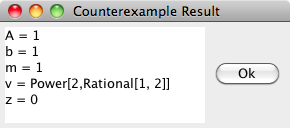
Power[2,Rational[1,2]]found for variablemis the square root √2. Also note that after you found a counterexample, you need to click Proof->Stop to stop searching for counterexamples. - Also See:
-
- Tutorial: Find a Counterexample
I cannot see the transition system. I want to visualize the actions of my hybrid program
- Problem:
- I cannot generate transition system views for my hybrid programs or I cannot even find the button that would show me a visualization
- Solution:
-
Make sure you have installed a graph visualization tool like graphviz/dotty on your computer.
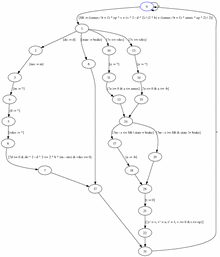
In the Current Goal view just right-click on a hybrid program within the formula to open the context menu for applicable proof rules. Then choose Visualization Rule to generate the transition system view for this hybrid program.
This will generate a transition system view in the file placed in
/tmp/dottyfile.dot(make sure the path/tmpor\tmpexists on your disk). Any graph visualization tool can be used to display the transition system view placed in/tmp/dottyfile.dotfile. If thedottytool is properly configured and in your system path, then KeYmaera will display the transition system automatically when you use the Visualization Rule. See applying proof rules.
Using the Visualization Rule on ETCS-simple, for instance, will produce
- Also See:
- Example in Controlled Moving Point and simple aircraft roundabout and water tank.
KeYmaera is stuck and does not try to continue
- Problem:
- I have been working with KeYmaera for a while, but all of a sudden it doesn't do anything when I click Proof->Start.
- Solution:
-
When you start and stop proofs a lot, then you can sometimes get KeYmaera confused about its strategy caches, so that KeYmaera thinks it has tried everything already when it really didn't. That is an annoying bug, but fortunately not soundness critical and there's a simple workaround. Just use goal back on the current node, which will make KeYmaera reconsider its options. If the problem persists, you can also just go to Hybrid Strategy, then Advanced Options, and turn on the Reset Strategy option. This will force KeYmaera to clear its caches. Then use Proof->Start.
After that, continue your proof.
- Also See:
- Advice on interaction in KeYmaera.
I have a different question
- Problem:
- I have a different question about KeYmaera that is not answered here.
- Solution:
- Please direct your question to the KeYmaera mailing list.